Stop Wasting Hours: Here’s How to Rapidly Prototype Websites Using Code
Introduction
If you are a SaaS founder, an indie hacker, or a web agency owner, you know that speed is everything. The faster you can get a functional product in front of real users, the faster you can validate your idea, collect feedback, and generate revenue. But pacing is often blocked by the traditional design-to-development pipeline. You might spend weeks tweaking pixels in a design tool before a single line of code is written. That is why learning how to rapidly prototype websites is one of the most critical skills you can develop in 2026.
When you master the art of prototyping websites, you stop wasting time on ideas that do not stick and start building momentum quickly. In this comprehensive guide, we will break down the precise strategies and tools you need to build a quick website mockup that looks professional, functions smoothly, and is ready for real users.
Key Takeaways
- Speed over perfection: Focus on validating the core user flow rather than obsessing over minute visual details in the early stages.
- Start low-fidelity: Always begin with paper sketches or simple wireframes to map out the structure before moving to high-fidelity tools.
- Use the right tools: Leverage modern solutions to drastically reduce time spent going from idea to interactive mockup.
- Skip the pure design phase: By using premium component libraries like ogBlocks components, developers can build functional, production-ready prototypes directly in code without needing a standalone design file.
Table of Contents
- Introduction
- Why Speed is Your Secret Weapon
- The Dangers of Skipping the Mockup Phase
- Step-by-Step: Building Your Prototype
- Top Tools for Creating a Quick Mockup
- Prototyping Directly in Code
- Why ogBlocks is the Ultimate Solution
- Common Mistakes to Avoid
- Best Practices for Indie Hackers & Agencies
- Frequently Asked Questions (FAQ)
- Conclusion
Why Speed is Your Secret Weapon

In the highly competitive SaaS and agency landscape, the first mover often wins. But moving fast does not mean writing sloppy code or shipping broken user interfaces. It means optimizing your workflow so that you spend less time deliberating and more time testing.
When you figure out how to rapidly prototype websites, you unlock a superpower. You can:
- Validate ideas instantly: Show potential customers a working interface and gauge their willingness to pay before writing complex backend logic.
- Secure stakeholder buy-in: For agency owners, showing a client a tangible, interactive layout wins contracts much faster than explaining abstract concepts or sending plain text proposals.
- Identify UX flaws early: Watching a user try to navigate a quick website mockup exposes friction points immediately. Fixing these issues in the prototype stage is 100x cheaper than fixing them after the app is built.
The Dangers of Skipping the Mockup Phase
Many aggressive indie hackers are tempted to skip prototyping a website altogether. "I will just build it," they say. While diving straight into Next.js or React might feel productive, it almost always leads to architecture debt and disjointed user experiences.
When you skip the mockup phase, you end up designing in the browser while trying to manage state, routing, and database schemas simultaneously. This results in:
- Scope creep: Without a clear visual blueprint, you keep adding features that distract from the core value proposition.
- Inconsistent design: Buttons have different border radii, spacing is irregular, and the typography hierarchy is a mess.
- Wasted engineering hours: Realizing that a user flow does not make sense after you have already built the database tables and API routes is a painful and expensive lesson.
Prototyping websites serves as the architectural blueprint for your digital product. Just as you would not build a house without a blueprint, you should not build an application without a prototype.
Step-by-Step: Building Your Prototype
Creating a rapid prototype does not mean slapping random components together. It requires a systematic approach to ensure you are actually solving the user's problem. Here is the proven 4-step framework for moving from concept to interactive mockup.
Step 1: Define the Core User Flow
Before you open any software, define exactly what the prototype needs to achieve. Who is the user, and what is their primary goal? If you are building an email marketing SaaS, the core flow might be: Sign Up -> Create Campaign -> Send Email. Strip away everything else. Do not worry about the billing page, the settings menu, or the terms of service. Focus exclusively on the "happy path."
Step 2: Start with Low-Fidelity Sketches
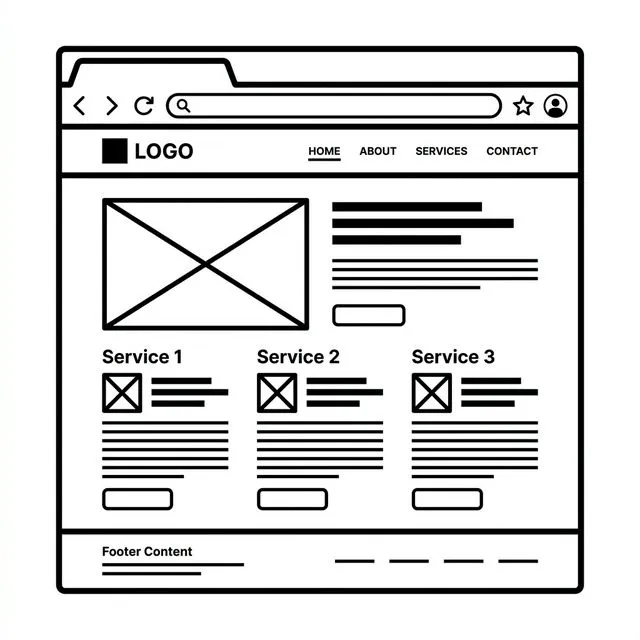
Grab a pen and a piece of paper. This is still the fastest way to get ideas out of your head. Draw the rough layout of the core screens.
- Where does the navigation go?
- How is the dashboard organized?
- Where are the primary call-to-action (CTA) buttons?
These sketches do not need to be pretty. They just need to establish the information architecture.
Step 3: Move to High-Fidelity Mockups
Once you have the structure defined, it is time to make a quick website mockup. You can use traditional design software for this, or if you are comfortable in code, you can use pre-built frontend blocks. The goal here is to establish the aesthetic direction—colors, typography, and visual hierarchy.
Step 4: Make it Interactive
Static images are okay, but interactive prototypes are vastly superior. Connecting screens so that buttons actually navigate to new views gives users a real sense of the product. This is where you test the flow, gather feedback, and iterate before doing the heavy lifting in development.
| Feature | Traditional Design (Figma) | Modern Rapid Prototyping (ogBlocks) |
|---|---|---|
| Output Fidelity | Static/Interactive Mockup (Non-Code) | Production-Ready React/Tailwind Code |
| Development Speed | Medium (Requires handoff translation) | Ultra High (Copy-paste to live env) |
| UX Validation | Visual/Conceptual | Functional/Keyboard Accessible |
| Tool Learning Curve | High (Complex Design Tools) | Low (Standard Web Technologies) |
Top Tools for Creating a Quick Mockup
The market is flooded with design tools, but only a few are truly optimized for raw speed. Here are the top external platforms used by top-tier agency developers and SaaS founders:
- Figma: The undisputed king of interface design. Figma allows you to create high-fidelity screens and link them together in interactive flows. Its massive ecosystem of community plugins makes it incredibly powerful.
- Penpot: The open-source alternative to Figma that is gaining massive traction among developers who prefer open ecosystems.
- Framer: Bridging the gap between design and development, Framer is fantastic for creating high-fidelity, animated prototypes that feel remarkably like real websites.
- Balsamiq: If you struggle to keep things low-fidelity and get distracted by colors and fonts, Balsamiq forces you to focus purely on structure with its simplistic, sketch-like interface.
- Paper: An excellent emerging canvas that acts as a free-form workspace to quickly piece together layouts, references, and components before writing code.
While these tools are fantastic, they introduce a significant problem for developers: the translation phase. You still have to convert that design into code.
Prototyping Directly in Code
For many indie hackers and developers, the fastest way to prototype is to skip the traditional design software completely and build directly in the browser.
When you know how to rapidly prototype websites using actual code, the prototype is the product. You are not building a throwaway artifact; you are building the V1 of your actual application.
This is where the magic of modern CSS frameworks and component libraries comes into play. By leveraging atomic CSS (like Tailwind CSS) and robust, accessible component primitives (like Radix UI), you can snap together complex interfaces in minutes.
The workflow looks like this:
- Initialize a new Next.js or Vite project.
- Install your chosen component library.
- Scaffold the layouts using pre-built blocks (hero sections, pricing tables, dashboards, etc.).
- Deploy the static application to a platform like Vercel or Netlify to share with stakeholders.
This approach eliminates the design-to-development handoff entirely. Your quick website mockup is essentially the frontend of your application, ready to be wired up to a backend.
Why ogBlocks is the Ultimate Solution
If you want to master prototyping websites directly in code, you need a system that gives you maximum speed without sacrificing quality. This is precisely why we built the ogBlocks component library.
When you use traditional UI kits, you often end up wrestling with massive dependencies or battling against highly opinionated styles that are difficult to override. Alternatively, writing everything from scratch means spending hours tweaking standard dropdown menus, accessible modals, and responsive navigation bars.
With ogBlocks, you get the absolute best of both worlds. It is the ultimate tool for developers who want to rapidly prototype websites and ship to production instantly.
Here is why developers, founders, and agencies are choosing ogBlocks:
1. Zero-Friction Copy and Paste
ogBlocks is not a bulky npm package that takes over your architecture. It is a collection of beautifully designed, highly accessible React components that you literally copy and paste directly into your project. You own the code. You can modify it infinitely. This drastically reduces the time it takes to build a quick website mockup.
2. Built on Industry Standards
Every block is built on top of Tailwind CSS and Framer Motion, utilizing the robust Radix UI primitives for perfect accessibility. You do not have to worry about ARIA labels or keyboard navigation—we have handled all the complex engineering for you.
3. Production-Ready Aesthetics
A prototype needs to look good to build trust. Instead of spending days trying to nail the perfect gradient, shadow, or border radius, ogBlocks provides a stunning, modern aesthetic right out of the box. Your prototype will look like it was crafted by an expensive design agency.
4. Comprehensive Block Selection
Whether you are building a B2B SaaS dashboard, a consumer landing page, or a complex e-commerce flow, ogBlocks has you covered. From hero sections and authentication modals to complex data tables and pricing cards, you have all the building blocks necessary.
Stop wasting time translating Figma files into React components. Skip the traditional design phase, copy your layout from ogBlocks, and have a beautiful, functional prototype running locally in under an hour. Get access to ogBlocks today and supercharge your development speed.
Common Mistakes to Avoid
Even with the best tools, it is easy to fall into traps that slow down your momentum. When prototyping a website, be sure to avoid these common pitfalls:
1. Obsessing Over Minor Details
A prototype is meant to test the structure and the flow. Do not spend three hours adjusting the hex code of a secondary button or tweaking a micro-interaction animation. Those details come later. Focus on the core user journey.
2. Overcomplicating the Scope
It goes back to defining the core objective. If you are testing a new feature, only prototype that feature. Do not rebuild the entire application surrounding it. Keep the scope as narrow as possible.
3. Using Fake Data Exclusively
While generic text is fine for an initial wireframe, a high-fidelity prototype needs realistic data. Using real names, relevant copy, and realistic images helps stakeholders and test users understand the context of the design. If your SaaS helps dentists manage appointments, use dental terms in your mockup, not generic placeholder text.
4. Ignoring Mobile Responsiveness
In 2026, mobile-first design is a hard requirement. If you are building a quick website mockup, ensure that you test how it feels on a smaller screen. The worst thing you can do is validate a desktop design only to realize it is completely unusable on an iPhone.
Best Practices for Indie Hackers & Agencies
To truly optimize your workflow for speed and conversion, implement these strategic best practices:
- Create a personal template repository: Whether it is a Figma file or a boilerplate Next.js repository, having a starting point with your preferred fonts, colors, and basic layouts saves hours on every new project.
- Set a strict time limit: Give yourself 4 hours to build the prototype. A tight deadline forces you to make decisions quickly and prevents feature bloat.
- Focus on the "Aha!" moment: Your prototype should guide the user as quickly as possible to the core value of your product. If you are building an AI tool, the prototype should focus on the exact moment the AI generates the expected outcome.
- Standardize your component stack: By consistently using a library like ogBlocks components, you build muscle memory. You will know exactly which blocks to grab for specific UI challenges, making your workflow exponentially faster over time.
Frequently Asked Questions
What is the fastest way to prototype a website?
The fastest way is to skip the high-fidelity design phase entirely and build directly in code using a copy-and-paste UI library like ogBlocks. This allows you to construct a working, interactive mockup that doubles as your production-ready frontend framework.
What is the difference between a wireframe and a prototype?
A wireframe is a static, low-fidelity, structural blueprint of a page (often just boxes and lines). A prototype is a higher-fidelity representation that typically includes interactivity, allowing users to click through simulated workflows.
How long should it take to create a quick website mockup?
Depending on the complexity of the application, a solid prototype testing a single core user flow should take no more than 4 to 8 hours. If it is taking weeks, you are over-designing, and you need to scale back the scope.
Can I use my prototype as the final website?
If you prototype directly in code using tools like React, Tailwind, and a premium component library, absolutely! This is the most efficient workflow for modern developers. Code-based prototypes can naturally evolve into the final production platform.
Conclusion
Understanding how to rapidly prototype websites is the key to launching faster, validating ideas efficiently, and saving thousands of dollars in wasted development hours. Whether you start with a napkin sketch or jump straight into the browser, the goal is always the same: test the core user experience before you commit to the heavy engineering.
For SaaS founders, indie hackers, and agency developers who want to bypass the tedious design translation phase and move straight to production-ready code, the answer is clear. Elevate your development workflow, create a stunning quick website mockup in minutes, and launch your next high-converting product.
Ready to build faster than ever before? Buy the ogBlocks component library today and transform the way you prototype and build websites.
Written by Karan
Karan is a React engineer and the founder of ogBlocks, building high-performance UIs for SaaS.