11 SEO Footer Best Practices That You're Ignoring
When it comes to optimizing a website for conversions and search traffic, most founders, indie hackers, and developers obsess over the hero section or the main navigation bar. It makes sense—that is the first thing users see. But the absolute bottom of your website—the footer—is secretly one of the most powerful, underutilized areas for both user experience and search engine rankings.
Think about user behavior. When a visitor scrolls all the way down to the bottom of your pricing page or landing page, they are highly engaged. They are actively looking for more information, trying to verify your credibility, or searching for a specific resource they couldn’t find in the top navigation. If your footer is a messy, disorganized afterthought, you are losing potential customers at the exact moment they are deciding whether or not to trust you.
If you are a SaaS founder, an indie hacker, or running a web development agency, your footer is your last chance to guide a visitor, capture a lead, or send strong trust signals to search engine algorithms. Implementing proper seo footer best practices can significantly reduce bounce rates and drastically improve how search engines crawl and understand your site architecture.
In this comprehensive guide, we will break down exactly how to structure your footer, what types of links you absolutely must include, the psychology behind bottom-of-page navigation, and the most common optimization mistakes to avoid.
Key Takeaways
- Don't stuff links: Treat your footer as a secondary navigation tool, not a dumping ground for every single URL on your site. Quality and relevance always beat quantity.
- Prioritize trust: Always include mandatory legal pages, privacy policies, and verified contact information to build credibility with both human users and algorithm quality raters.
- Distribute authority: Use the footer strategically to pass link equity to your highest-value SaaS features, core service pages, or highest-converting landing pages.
- Stay consistent: Keep the design, layout, and link structure uniform across every single page of your website to ensure a seamless, professional user experience.
Table of Contents
- Why the Footer Matters for Search Rankings
- 11 Essential SEO Footer Best Practices
- 1. Keep It Organized and Scannable
- 2. Include Essential Legal and Compliance Links
- 3. Add Contact Information for Local Trust
- 4. Provide Customer Support Resources
- 5. Use Descriptive Anchor Text
- 6. Link to High-Value Internal Pages
- 7. Avoid Keyword Stuffing
- 8. Ensure Mobile Responsiveness
- 9. Add Trust Signals and Social Proof
- 10. Include a Final Call to Action (CTA)
- 11. Keep the Design Consistent
- Common Mistakes in Footer Optimization
- Frequently Asked Questions
- Conclusion: Upgrade Your UI Today
Why the Footer Matters for Search Rankings
The footer is persistent; it typically appears on almost every single page of your website. Because of this architectural reality, search engines pay incredibly close attention to the links housed down there.
When Google, Bing, or AI-driven search bots crawl your website, the footer acts as a universal roadmap. It tells the bots exactly which pages you consider the most vital to your business. If you link to a specific "Email Marketing Automation" feature page from your footer, that specific page receives a small fraction of "link equity" (or authority) from every single page on your site. For a website with hundreds of blog posts, this is a massive opportunity for internal linking and can push a stubborn page from position 15 to position 3 on the search engine results page.
Furthermore, search engines look for highly specific trust signals in your footer content to verify that your business is a legitimate entity. This is a core component of E-E-A-T (Experience, Expertise, Authoritativeness, and Trustworthiness). If you lack a clear privacy policy, terms of service, or valid contact details, search algorithms may view your SaaS or agency as a fly-by-night operation, ranking you lower than a well-documented competitor.
If you want to read more about tracking your performance after making architectural changes, check out our in-depth guide on the best SaaS SEO tools to monitor your rankings.
11 Essential SEO Footer Best Practices
Let's dive deep into the core strategies you should implement right now. These footer seo recommendations will help you strike the perfect balance between exceptional user experience and aggressive search engine optimization.
1. Keep It Organized and Scannable
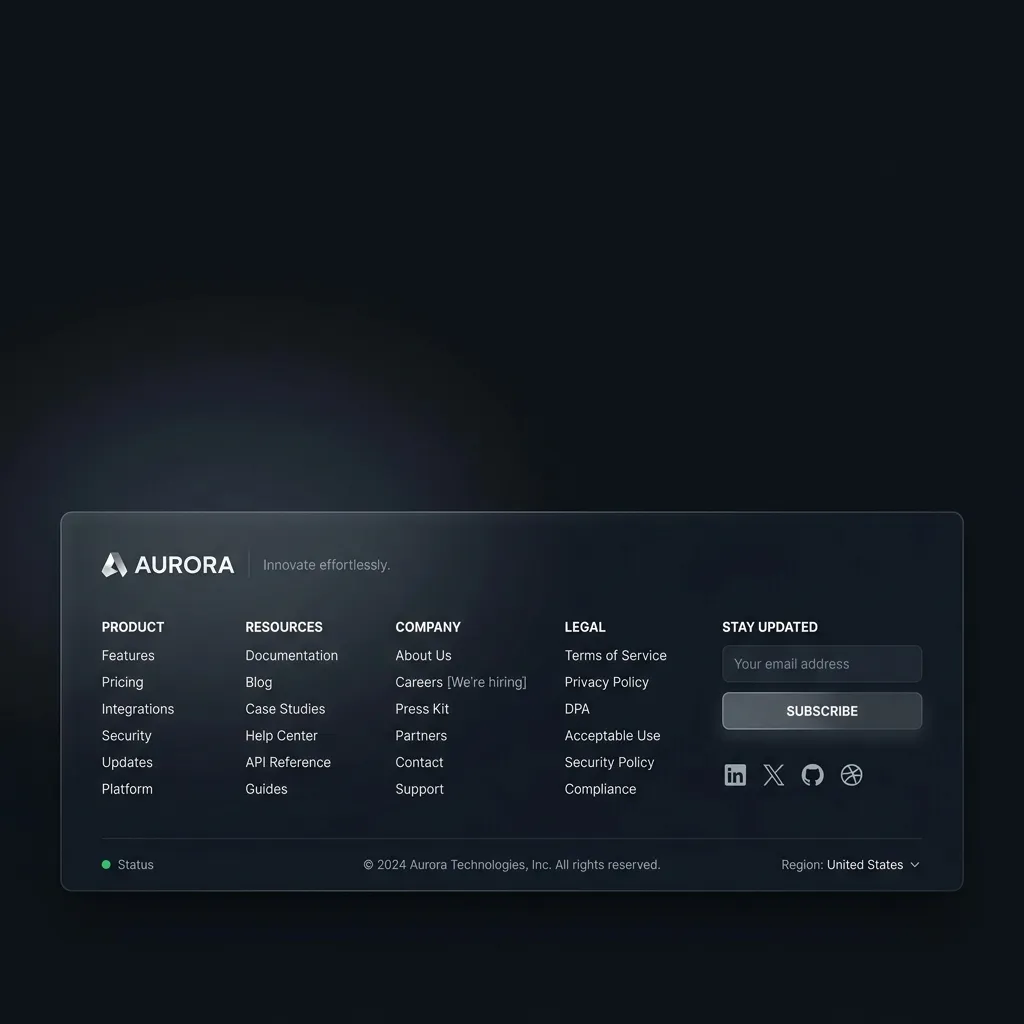
Your footer should never look like a chaotic wall of text or a random assortment of URLs. It needs to be highly organized, visually pleasing, and easy for a user to scan in a matter of seconds.
For SaaS and agency websites, the absolute best approach is to categorize your links into logical vertical columns. A standard, high-converting layout usually includes 3 to 5 distinct columns, with clear, slightly bolded header titles for each section.
Common footer categories for SaaS include:
- Product/Features: Links to your core software offerings, integrations, and changelog.
- Resources: Blog, documentation, tutorials, API references, and case studies.
- Company: About us, careers, contact information, and press kits.
- Legal: Terms of service, privacy policy, and cookie policy.
By grouping links logically, you massively improve the user journey. You make it easier for potential customers to find exactly what they are looking for without getting frustrated and bouncing back to the search results.
2. Include Essential Legal and Compliance Links
This is entirely non-negotiable for any modern business. Every website needs a dedicated section for legal compliance. Search engine quality raters actively look for these specific pages to determine if a website is a legitimate business entity that complies with global data laws.
Make sure your footer explicitly includes:
- Privacy Policy: Essential for GDPR, CCPA, and general user trust.
- Terms of Service (ToS): Protects your SaaS or agency legally and outlines the rules of engagement.
- Cookie Policy: Required in many European and international jurisdictions.
While these pages won't directly rank for high-volume commercial keywords, their presence boosts the overall domain authority, credibility, and trustworthiness of your site, which indirectly lifts your overall seo performance across all your money pages.
3. Add Contact Information for Local Trust
Even if you run a globally distributed SaaS product, including a physical address (or at least a primary registered business location) is a tremendously strong trust signal. It proves to both skeptical users and rigorous search algorithms that you are a real company with a real physical footprint.
If you run a web development agency targeting local clients, this step is even more critical. You should include your full NAP (Name, Address, Phone number) directly in the footer. Consistent NAP data across your website and external directories is a foundational, non-negotiable pillar of local search optimization.
Pro Tip: If you have a support or sales email address in the footer, make it a clickable mailto: link so users can reach out instantly from their default mail client.
4. Provide Customer Support Resources
When users scroll all the way to the bottom of a page, they are very often looking for help. If they can't figure out how your complex SaaS tool works, or they have a billing question, they will immediately scroll down to find a "Help Center" or "Support" link.
Ensure you include links to:
- Comprehensive Documentation / Knowledge Base
- FAQ pages
- Support ticketing system or live chat portals
- Developer API documentation (crucial for developer-focused or B2B tools)
- Community forums or Discord servers
Making support easily accessible drastically reduces customer frustration, lowers your churn rate, and prevents users from bouncing off your site to look for answers on a third-party forum or, worse, a competitor's blog.
5. Use Descriptive Anchor Text
The clickable text of your links—known as the anchor text—gives search engines vital context about the destination page. One of the most critical seo footer best practices is to use clear, highly descriptive anchor text rather than vague directives.
Instead of generic labels like "Click Here," "Read More," or "Learn More," use specific, topically relevant terms.
- Bad: Learn More
- Good: SaaS Pricing Plans
- Bad: Our Tool
- Good: Email Marketing Automation Feature
This strategy helps search engines understand the exact topical relevance of the pages you are linking to, passing far more contextual SEO value to those destination pages. For more context on why this matters, authoritative sources like Search Engine Land have extensive documentation on internal linking strategies and the power of anchor text.
6. Link to High-Value Internal Pages
Because your footer appears on every page, it is prime real estate for internal linking. These links pass a significant amount of authority globally across your domain.
You should strategically place links to your most important, highest-converting pages. For a SaaS company, this might be your top feature pages, your native integration directories, or your bottom-of-funnel comparison pages (e.g., "Our Tool vs Competitor X"). For an agency, this should be your core service offerings (e.g., "Next.js Development Services" or "SEO Audits").
However, be highly selective. Only include pages that drive direct revenue or provide immense, undeniable value to the user. Do not link to low-value pages like author archives, thin blog category tags, or outdated press releases.
7. Avoid Keyword Stuffing and Link Hoarding
In the early 2000s, it was common practice to stuff hundreds of links, city names, and keyword variations into the footer to manipulate rankings. Today, this tactic is not only ineffective, but it will also actively get your site penalized by modern search algorithms.
Google considers excessive, irrelevant footer links to be a form of link spam. A good, modern rule of thumb is to keep your total footer link count between 10 and 25, depending on the scale of your website.
Furthermore, never hide text in the footer (e.g., placing white text on a white background) or write a massive, unreadable paragraph of keyword-stuffed gibberish. Keep the text natural, user-focused, visually clean, and highly relevant.
8. Ensure Mobile Responsiveness
Over 50% of global web traffic now comes from mobile devices. If your footer looks incredible on a 27-inch desktop monitor but breaks completely on an iPhone, you are going to lose conversions and suffer heavily in search rankings due to Google's strict mobile-first indexing policies.
On mobile devices, a multi-column footer should gracefully collapse into an accordion or a single-column vertical list. Users should be able to tap links easily with their thumbs without accidentally clicking the wrong one (Google refers to this specific metric as "tap target spacing").
Always test your footer on multiple physical devices and screen sizes to ensure the user experience remains absolutely flawless regardless of the viewport.
9. Add Trust Signals and Social Proof
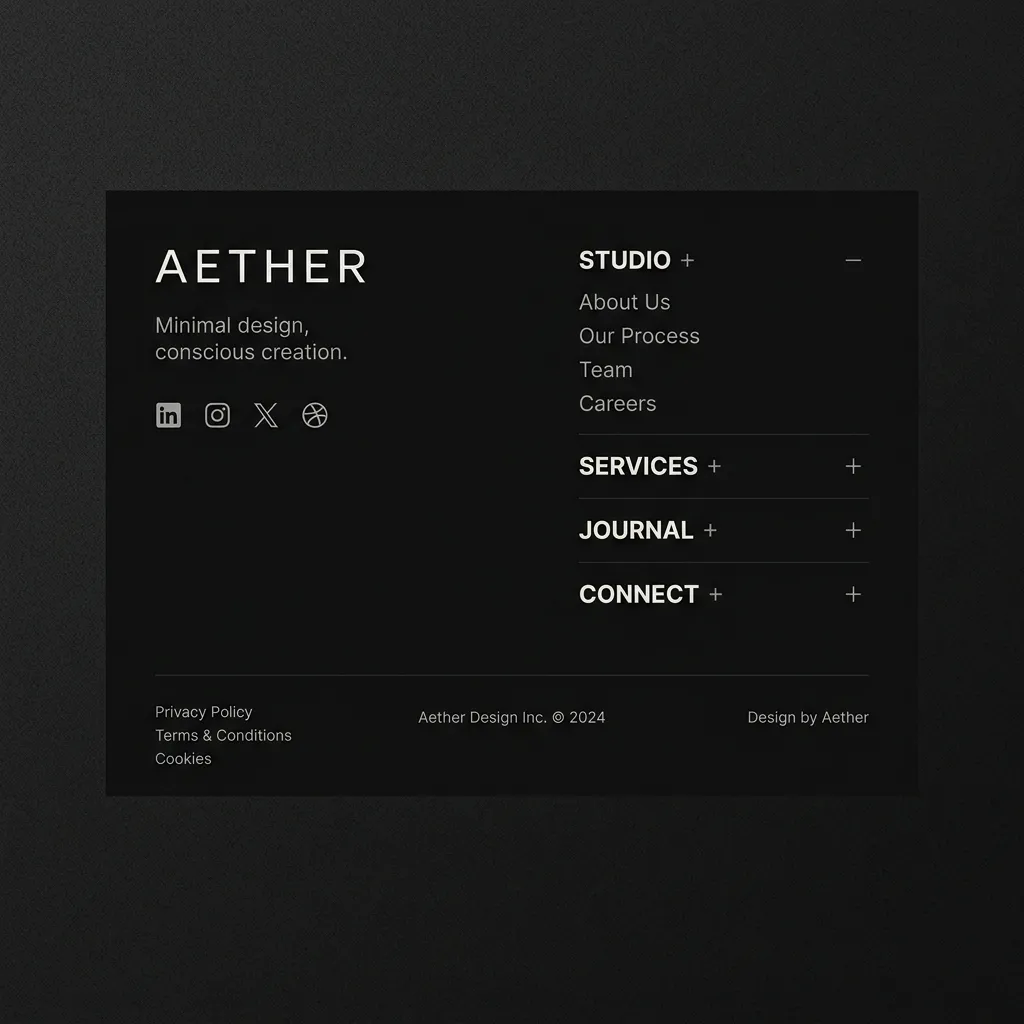
The footer is an excellent, final place to reinforce trust before a user closes the tab or navigates away. Including subtle, authoritative trust signals can make a massive difference in a hesitant user's decision to hand over their credit card for your SaaS or sign a contract with your agency.
Consider adding:
- Badges from respected review sites (e.g., G2 Leader badges, Capterra, or Trustpilot stars).
- Security and compliance badges (e.g., SOC 2 Compliance, HIPAA compliant, SSL secure).
- Payment provider logos (Visa, Mastercard, Stripe, PayPal) to visually confirm you accept secure, standard payments.
- Links to your active social media profiles to prove your community engagement.
If you want a deeper dive into the psychology of this topic, we wrote a comprehensive guide on how to show social proof on your website effectively.
10. Include a Final Call to Action (CTA)
By the time a user reaches the very bottom of your page, they have consumed your content, evaluated your offering, and are looking for direction. Don't let them just sit there—give them a clear, compelling next step.
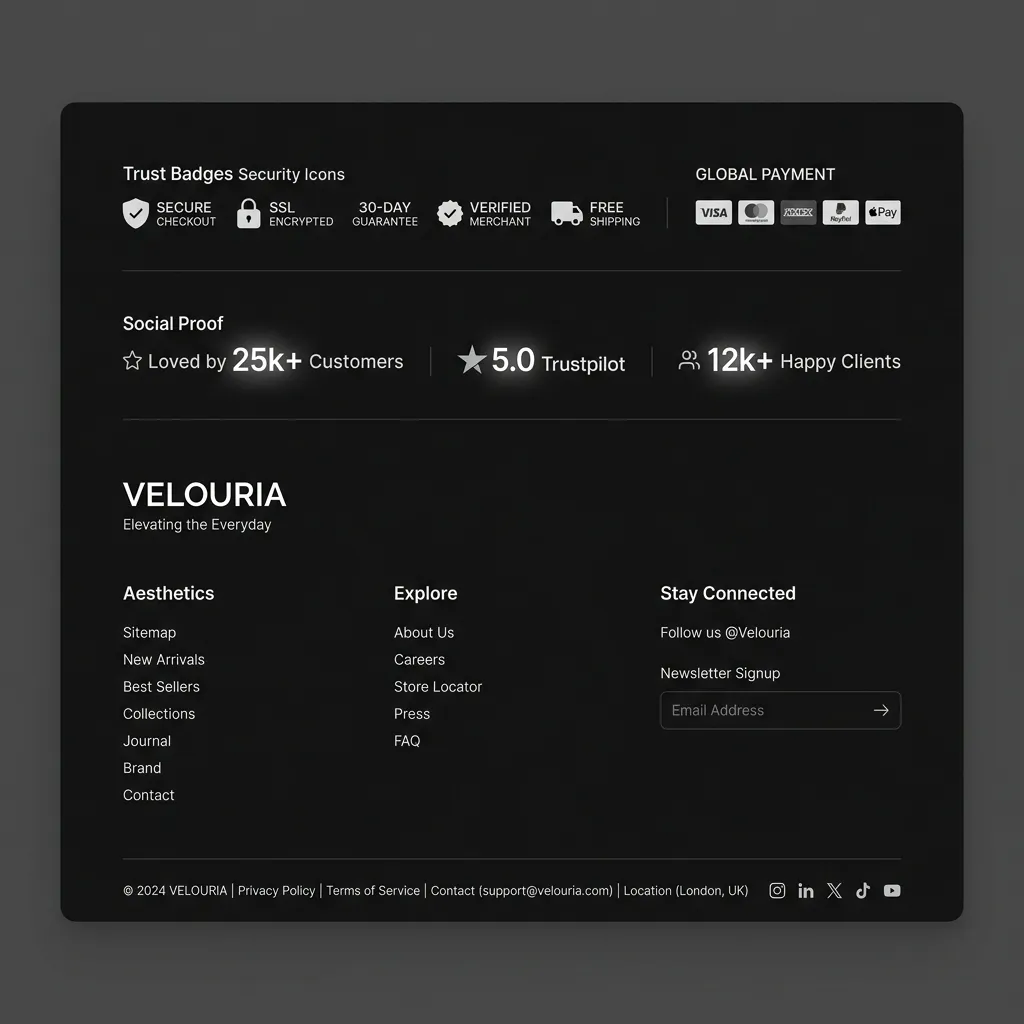
Just above the link columns, or integrated seamlessly into the top of your footer design, you should have a strong Call to Action. This could be an email newsletter signup form, a bold button to start a 14-day free trial, or a prompt to schedule a live demo with your sales team.
Make the CTA visually distinct from the rest of the footer links to draw the eye. Use contrasting colors and persuasive microcopy. For detailed advice on crafting the perfect bottom-of-page prompt, read our highly actionable article on CTA section design.
11. Keep the Design Consistent
Your footer should act as a reliable visual anchor. It needs to look functionally and aesthetically identical across every single page of your website.
Inconsistent footers confuse users and can cause severe crawling issues for search engine bots trying to map your site architecture. Use a master component (like a React or Next.js layout wrapper) in your codebase to ensure that when you update a link or change a color in the footer, it updates globally across the entire domain instantly.
The design should perfectly match your brand's overall aesthetic—using your designated brand colors, modern typography, and a prominent, high-resolution logo.
Common Mistakes in Footer Optimization
Even highly experienced web developers and seasoned marketers make mistakes when building out their bottom navigation. Here are the most detrimental pitfalls to avoid:
- Using Infinite Scroll: If your blog or e-commerce product page uses infinite scroll, users will literally never be able to reach the footer. It will keep pushing down as new content loads. If you absolutely must use infinite scroll, implement a "sticky" footer that hovers at the bottom of the viewport, or place the critical legal and support links in a persistent sidebar instead.
- Relying Solely on JavaScript for Navigation: Ensure your footer links are standard, semantic HTML
<a href="...">tags. If your links require complex JavaScript onClick events to render or function, search engine bots might not be able to crawl them properly, completely negating any SEO benefit. - Orphaned Social Icons: Don't just paste beautiful social media icons without actual links attached. Furthermore, make sure they open in a new tab (
target="_blank") so you don't aggressively pull users away from your site right when they were about to convert. - Forgetting to Update the Copyright Year: An outdated copyright year (e.g., © 2021) makes your site look abandoned and unprofessional. Use a simple, one-line JavaScript snippet (
new Date().getFullYear()) to automatically update the year dynamically. - Ignoring the Visual Hierarchy: Treating all links with the exact same font weight and color makes the footer impossible to scan. Use visual hierarchy: slightly larger, bolder fonts for category headers, and softer, lighter fonts for the links beneath them.
Frequently Asked Questions
How many links should be in a website footer? For most SaaS companies, indie projects, and agency websites, a good rule of thumb is between 10 and 25 links. This provides enough utility for users without diluting page authority or appearing like link spam to search engines. If you have a massive e-commerce site, you might have more, but always prioritize quality, relevance, and user intent over sheer quantity.
Does the footer impact SEO? Yes, it absolutely impacts search rankings. It helps distribute internal link equity across your most important pages, provides critical, easily accessible crawl paths for search engine bots, and hosts essential trust signals like privacy policies and contact information that human quality raters look for when evaluating your domain.
Should I put my sitemap in the footer? Yes, linking to your HTML sitemap or XML sitemap in the footer is a fantastic practice. It ensures that search engines can easily find a directory of all your pages, which is especially helpful for large websites with complex, deep architectures.
Is it bad to hide links in the footer? Yes. Hiding links by making the text the exact same color as the background, sizing the font to zero, or using CSS to make them invisible to users but visible to bots, is a severe violation of Google's spam policies. This deceptive practice can and will result in a severe manual penalty. Always design your site for humans first.
Should I include external links in my footer? Generally, you should keep external links in the footer to a minimum to avoid leaking domain authority. However, linking to your active social media profiles, a trusted parent company, or verifying review platforms (like a G2 profile) are perfectly acceptable and actually encourage trust.
Conclusion: Stop Wasting Your Footer Space
Your website's footer is prime, highly valuable real estate that is too often ignored by developers rushing to launch. By implementing these seo footer best practices, you can drastically improve your site's navigation, pass valuable link equity to your most important product pages, and build undeniable trust with your target audience.
Remember to keep the design clean, avoid the temptation of keyword stuffing, and ensure that every single link serves a genuine, helpful purpose for your users. Good footer content is entirely about striking the perfect balance between user utility and architectural optimization.
Ready to upgrade your website's UI? Building beautiful, optimized, mobile-responsive, and accessible footers from scratch takes hours of tedious CSS wrangling and component building. If you are a SaaS founder, an indie hacker, or an agency owner looking to ship products faster and increase your profit margins, you need a competitive edge.
Stop wrestling with flexbox alignment and start building faster. Buy the ogBlocks component library today. You will get instant, lifetime access to premium, highly-converting React components—including perfectly designed, SEO-ready footers, hero sections, pricing tables, and testimonial grids that you can drop straight into your Next.js codebase.
Don't let bad design hurt your conversions. Get ogBlocks now and launch your next high-converting project in record time.
Written by Karan
Karan is a React engineer and the founder of ogBlocks, building high-performance UIs for SaaS.