Stop Blending In: How to Make Your Website Look Less Generic
If I opened 10 SaaS landing pages right now, chances are at least 8 of them would look exactly the same.
The formula is common: a bold headline on the left, a dashboard screenshot on the right, three columns of feature icons below, and a gray pricing table at the bottom.
As a SaaS founder, indie hacker, or web agency owner, you're competing for attention in a crowded space. When a potential customer lands on your site, they decide quickly if you are a credible solution. If your site looks like every other template, you may lose conversions before the user even scrolls.
How to make your website look less generic without spending $20,000 on a design agency?
Here is exactly how you can elevate your frontend aesthetics to make your website look professional and build an experience that converts.
Key Takeaways
- Avoid default styles: Using default framework styles is a quick way to look generic. Customizing your typography and spacing makes a big difference.
- Add micro-interactions: Subtle animations make your site feel responsive.
- Maintain consistency: Reusing high-quality, unified components across your site builds trust.
- Use whitespace: Don't cram elements together. Let your design breathe to elevate the perceived value of your product.
Table of Contents
- The Hidden Cost of Standard Templates
- How to Avoid Generic Web Design: 4 Core Strategies
- How to Make Your Website Look Professional Instantly
- Use Premium UI Components
- Frequently Asked Questions
- Improve Your Website Design Today
The Hidden Cost of Standard Templates
When shipping an MVP quickly, it's common to buy a standard theme, change the logo, and launch.
However, according to research from the Stanford Web Credibility Project, 75% of users admit to making judgments about a company's credibility based on their website design.
If you want to charge for your SaaS or your agency services, your website has to look the part. If your site looks like a cheap template, prospects may assume your product is unreliable. A generic design signals a lack of effort, and in the digital world, effort equates to quality.
How to Avoid Generic Web Design: 4 Core Strategies
You don't need a degree in fine arts to understand good design. You just need to stop doing what the masses are doing. Here are four actionable ways to avoid generic web design and inject life into your product.
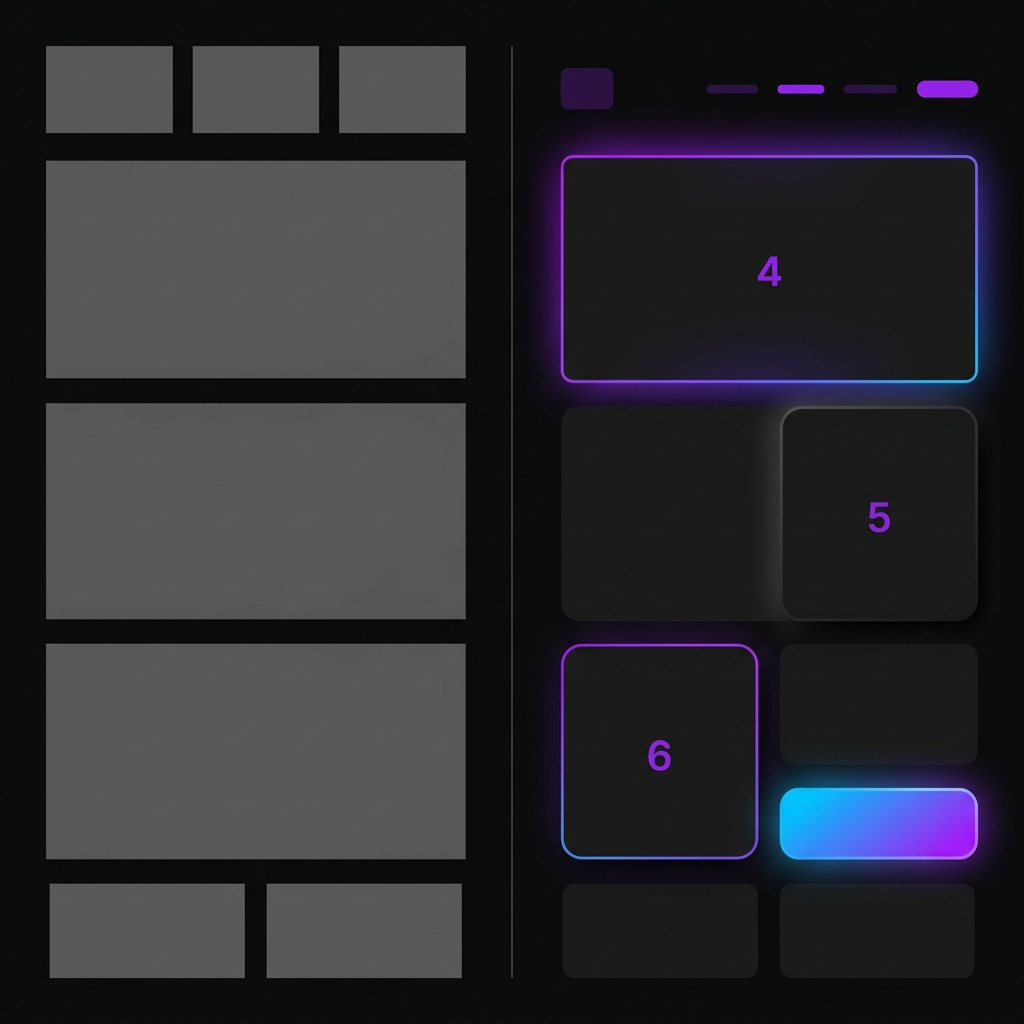
1. Break the Predictable Layout Grid
The standard hero section (text on the left, image on the right) is a classic because it works, but it's also the definition of generic.
If you want to know how to make your website look less generic, start by playing with your layouts. Instead of a standard two-column split, try:
- A massive, typography-driven center-aligned hero section.
- An asymmetrical grid layout (like a Bento grid) to showcase features.
- Overlapping elements that break out of their standard container constraints to create depth.
By simply changing the predictable flow of the page, you force the user to pay attention. Check out our guide on website hero section best practices for layout inspiration that converts.
2. Add Micro-Interactions
Static websites can feel unresponsive. When a user hovers over a card and nothing happens, the interface feels cheap.
To make your website look professional and premium, you must introduce micro-interactions. These are tiny, purposeful animations that respond to user input:
- A button that slightly scales down when clicked.
- A pricing card that subtly glows and elevates when hovered.
- Navigation links that feature a smooth underline animation.
These animations provide immediate feedback to the user, making the site feel responsive and well-engineered. If you're building in React, you can easily implement these. Read our deep dive on Framer Motion text animations to get started.
3. Stop Using Default Typography
If your website uses Arial, Helvetica, or the default system font without weight variation, you are missing an opportunity. Typography is the voice of your brand.
To avoid generic web design, upgrade your fonts:
- Choose a premium geometric sans-serif: Fonts like Inter, Satoshi, or Plus Jakarta Sans look incredibly modern and clean.
- Exaggerate your font sizes: Make your H1s massive and bold. Contrast is what makes typography look designed rather than just typed.
- Use font weights strategically: Pair an extra-bold (800) heading with a medium (500) subheadline and a regular (400) body text.
A site with terrible colors but excellent, high-contrast typography will still look professional. It is the most powerful tool in your design arsenal.
4. Limit Your Color Palette (The 60-30-10 Rule)
Using too many colors can make the interface look unprofessional.
Top-tier tech companies use restraint. They apply the classic 60-30-10 rule:
- 60% Primary Color: Usually a neutral dark background (like
#09090b) or a clean white. - 30% Secondary Color: Muted grays or slate tones for borders, secondary text, and cards.
- 10% Accent Color: A vibrant, glowing color (like electric blue or neon purple) used only for primary buttons, active states, and key highlights.
This creates a sleek, high-contrast environment where your call-to-actions actually pop.
How to Make Your Website Look Professional Instantly
There are a few immediate visual tweaks you can make to elevate your site.
Use Whitespace Strategically
Look at Apple. Look at Linear. Look at Stripe. What do they have in common? Massive amounts of empty space.
Whitespace (or negative space) is the ultimate indicator of luxury. It tells the user, "We are so confident in our product that we don't need to scream 50 features at you at once."
If you want to know how to make your website look professional in 5 minutes:
- Double the padding between your sections (go from
py-10topy-24). - Increase the line height of your body text to
1.6or1.7. - Give your UI cards more internal padding so the text doesn't touch the borders.
Let your design breathe.
Avoid Generic AI Illustrations
We all know the isometric tech illustrations of tiny people high-fiving over a giant smartphone. Five years ago, they were trendy. Today, they are the hallmark of generic web design.
As noted by design experts, generic AI-generated visual content can actively harm your brand's authenticity. Instead of meaningless illustrations, use:
- High-fidelity screenshots of your actual product.
- Beautiful, abstract code snippets (if targeting developers).
- Clean, minimal icons.
Show, don't just decorate. Authentic product visuals build trust much faster than stock vector art. If you're building a landing page, check out these SaaS landing page best practices for more tips on visual proof.
Use Premium UI Components
As a founder or indie hacker, you need to ship. You might not have the time to learn Framer Motion physics, bezier curves, and responsive grid layouts.
But as established, shipping a generic template will cost you customers.
This is exactly why we built ogBlocks.
ogBlocks is a copy-and-paste React component library specifically designed to solve the "generic website" problem. Instead of wrestling with CSS and animation states, you can drop in production-ready, beautifully designed components that instantly make your website look professional.
With ogBlocks, you get:
- Custom Layouts: Access to conversion-optimized hero sections, feature grids, and pricing tables.
- Smooth Micro-Interactions: Built-in Framer Motion animations that make your interface feel responsive and premium.
- Total Consistency: Every component uses the same spacing, typography scale, and design language, ensuring your site looks cohesive from top to bottom.
You don't need to be a design expert to build a great website with the right building blocks.
If you are serious about increasing your conversion rates and building a brand that users trust at first glance, get ogBlocks today and transform your generic landing page into a high-converting masterpiece in minutes.
Frequently Asked Questions
How can I make my website look less generic on a budget?
You can make your website look less generic by focusing on typography, generous whitespace, and adding subtle micro-interactions. These changes cost nothing but dramatically alter the feel of your site. Instead of building complex animations from scratch, use a premium React component library like ogBlocks to access high-quality, pre-built designs for a fraction of the cost of an agency.
What makes a web design look professional?
A professional web design relies on visual hierarchy, consistent component styling, high-contrast readable typography, and restraint in color choices. Avoid cluttered layouts, ensure every element aligns to a structured grid, and use high-quality, authentic imagery instead of cheap stock photos.
Why is avoiding generic web design important for SaaS?
In the SaaS market, your website is your digital storefront. Generic web design can make your product seem unreliable. A custom, polished look increases your credibility, improves user engagement, and ultimately drives higher conversion rates.
Improve Your Website Design Today
Your website is the first touchpoint for every potential customer.
To make your website look less generic, upgrade your typography, use whitespace strategically, introduce micro-interactions, and enforce a strict color palette.
You have built a great product. Don't let a standard template hold it back.
Ready to make your website look professional without writing hundreds of lines of complex CSS and animation logic? Get lifetime access to ogBlocks now and start building premium, unforgettable web experiences today.
Further reading: How to Make Your Website Look Premium
For more insights on building high-converting interfaces, explore our React Animated Components Guide.
Written by Karan
Karan is a React engineer and the founder of ogBlocks, building high-performance UIs for SaaS.